| Line 31: | Line 31: | ||
:<math> r_1 = c_1+jd_1, r_2 = c_1-jd_1, \ldots, r_{n-1} = c_k+jd_k, r_n = c_k-jd_k. </math> | :<math> r_1 = c_1+jd_1, r_2 = c_1-jd_1, \ldots, r_{n-1} = c_k+jd_k, r_n = c_k-jd_k. </math> | ||
Then a realization with matrices having real entries is given by | Then a realization with matrices having real entries is given by | ||
Revision as of 12:48, 29 November 2011
Introduction
On this page you will find a synthetic parametric model for which one can easily experiment with different system orders , values of the parameter , as well as different poles and residues.
Also, the decay of the Hankel singular values can be changed indirectly through the parameter .
System description
The parameter scales the real part of the system poles, that is, . For a system in pole-residue form
we can write down the state-space realisation with
Notice that the system matrices have complex entries.
For simplicity, assume that is even, , and that all system poles are complex and ordered in complex conjugate pairs, i.e.
and the residues also form complex conjugate pairs
Then a realization with matrices having real entries is given by
with ,
,
,
.
Numerical values
We construct a system of order . The numerical values for the different variables are
- equally spaced in ,
- equally spaced in ,
- ,
- ,
- .
In MATLAB the system matrices are easily formed as follows
n = 100;
a = -linspace(1e1,1e3,n/2).';   b = linspace(1e1,1e3,n/2).';
c = ones(n/2,1);                d = zeros(n/2,1);
aa(1:2:n-1,1) = a;              aa(2:2:n,1) = a;
bb(1:2:n-1,1) = b;              bb(2:2:n-2,1) = 0;
Ae = spdiags(aa,0,n,n);
A0 = spdiags([0;bb],1,n,n) + spdiags(-bb,-1,n,n);
B = 2*sparse(mod([1:n],2)).';
C(1:2:n-1) = c.';               C(2:2:n) = d.';   C = sparse(C);
Plots
We plot the frequency response and poles for a few different parameter values .
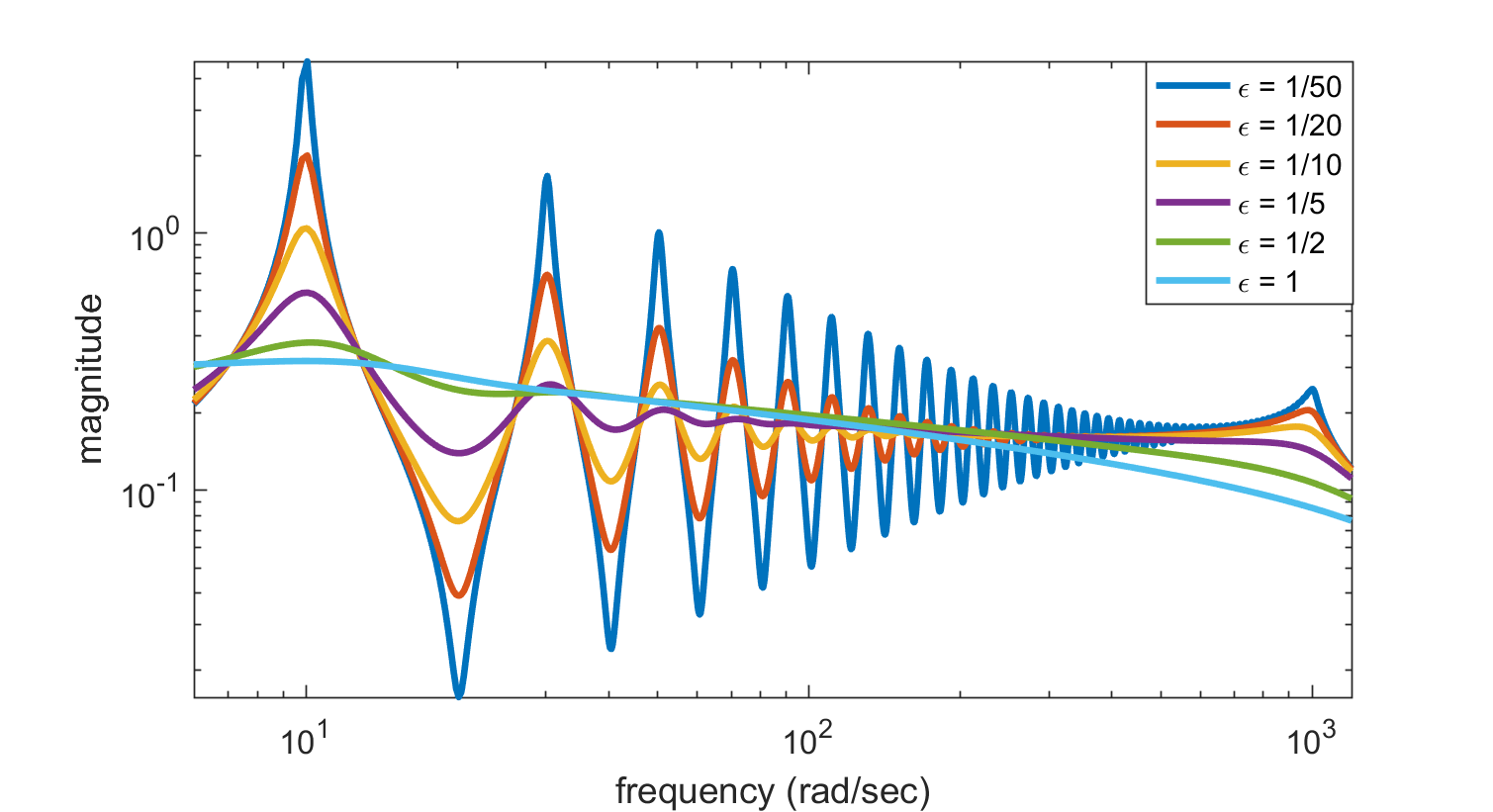
Frequency response of synthetic parametrized system, for parameter values 1/50 (blue), 1/20 (green), 1/10 (red), 1/5 (teal), 1/2 (purple), 1 (yellow).


These plots can be obtained in MATLAB using the following commands
r(1:2:n-1,1) = c+1j*d;     r(2:2:n,1) = c-1j*d;
ep = [1/50; 1/20; 1/10; 1/5; 1/2; 1];                       % parameter epsilon
jw = 1j*linspace(0,1.2e3,5000).';                           % frequency grid
for j = 1:length(ep)
  p(:,j) = [ep(j)*a+1j*b; ep(j)*a-1j*b];                    % poles
  [jww,pp] = meshgrid(jw,p(:,j));
  Hjw(j,:) = (r.')*(1./(jww-pp));                           % freq. resp.
end
figure,  loglog(imag(jw),abs(Hjw),'LineWidth',2)
         axis tight,    xlim([6 1200])
         xlabel('frequency (rad/sec)')
         ylabel('magnitude')
         title('Frequency response for different \epsilon')
figure,  plot(real(p),imag(p),'.')
         title('Poles for different \epsilon')